Quality records in a CNC shop: inspection, NCR, calibration
How to get inspection reports, nonconformance, calibration and maintenance records out of folders. A simple record system and Spindeo's Quality package.
- Published:
- Author:
- Spindeo team
- 7 min read

A customer asks for the inspection report of a batch you shipped six months ago. It is in a folder, on the inspector's computer or somewhere in email. The caliper's calibration date is on a list on the wall, the nonconformance in a spreadsheet, and the corrective action in someone's head. The records exist, but they are not connected, and finding one takes hours.
This article covers the basic quality records a shop should keep, why they belong on the work order, and how Spindeo's Quality package does it.
Four basic records
In any machine shop, large or small, quality rests on four records:
| Record | The question it answers |
|---|---|
| Inspection report | Does the part match the drawing, who measured it and when? |
| Nonconformance (NCR) | What went wrong, why, and what stops it happening again? |
| Calibration | Can we trust our gauges? |
| Maintenance | Were the machines serviced on time? |
These records prove their value together. We covered the chain that shows which material and work order a part came from in how to set up part traceability. Once quality records connect to that chain, what you need in an audit or customer complaint turns up in minutes.
Inspection: keep the report next to the work order
The biggest problem with an inspection report is losing it. If it is not linked to the work order, you have to search. So every inspection should link to a work order and, where possible, an operation.
In Spindeo, the Send to Inspection button on the work order's page opens a record with the work order, project and part filled in. There are six inspection types: first article, in-process, final, CMM, dimensional and visual. The inspector enters the date, their name and the result: passed, failed or rework.
You can enter dimensions line by line if you want. Nominal, minus and plus tolerance are entered separately, and each line's pass or fail is calculated for you. For a quick check, choosing the result and uploading the report is enough. A CMM printout, inspection sheet or photo can be attached and opens inside the page.
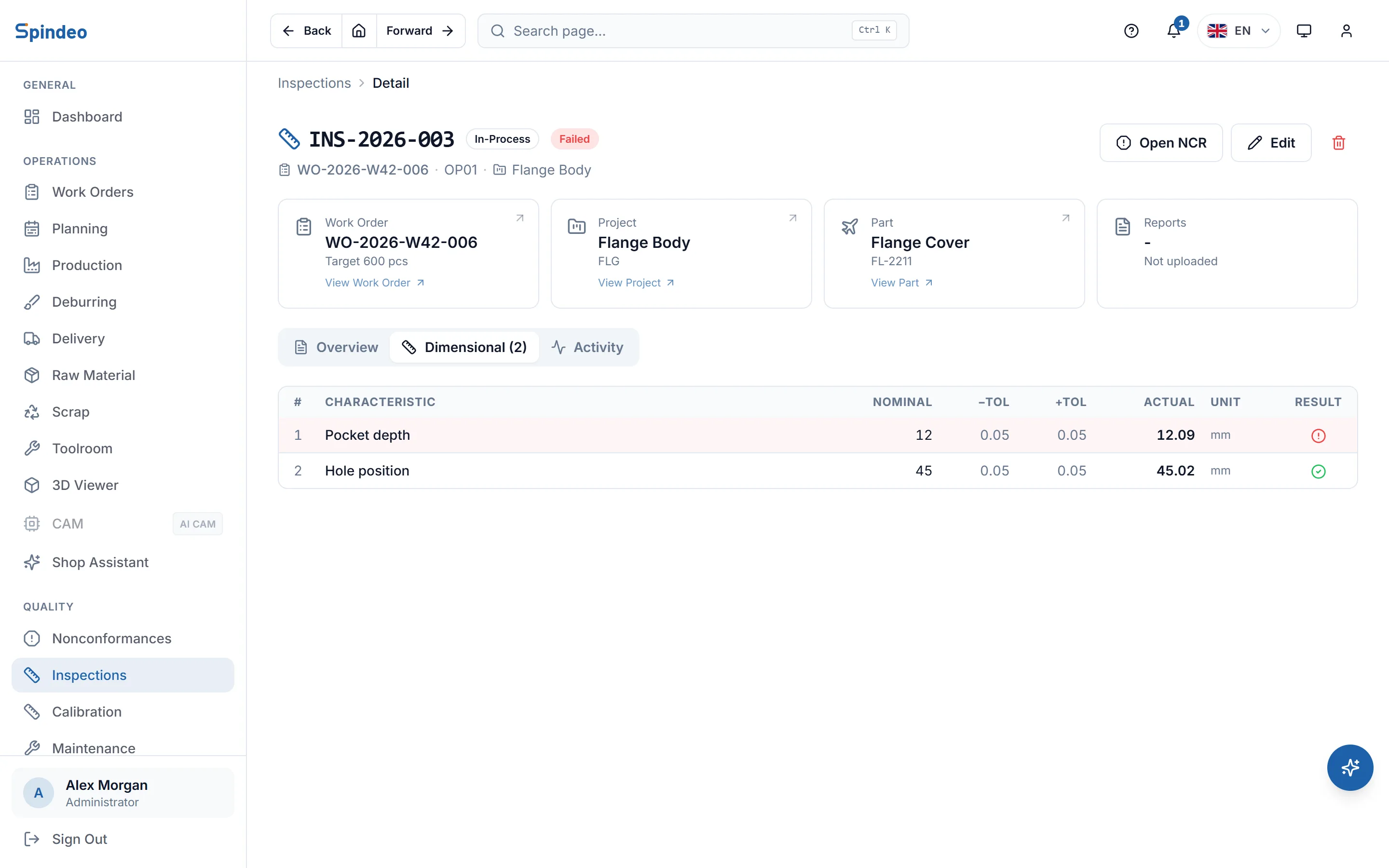
One limit up front: values in a CMM report are not copied into dimension lines automatically. The report is kept as a file and lines are entered by hand if needed.
Skipping first article approval is one of the most expensive causes of scrap, because the error spreads across the whole batch. The operation plan marks whether first article approval is required, and it shows as waiting or done in the plan's flow. The production side is covered in 7 ways to reduce scrap rate.
Nonconformance: no closing without a cause
A nonconformance record is more than a note that a part was bad. Its real purpose is to stop the same error returning. The most common failure is setting the bad part aside and ending the matter there. With no root cause written down, the same error comes back a few months later.
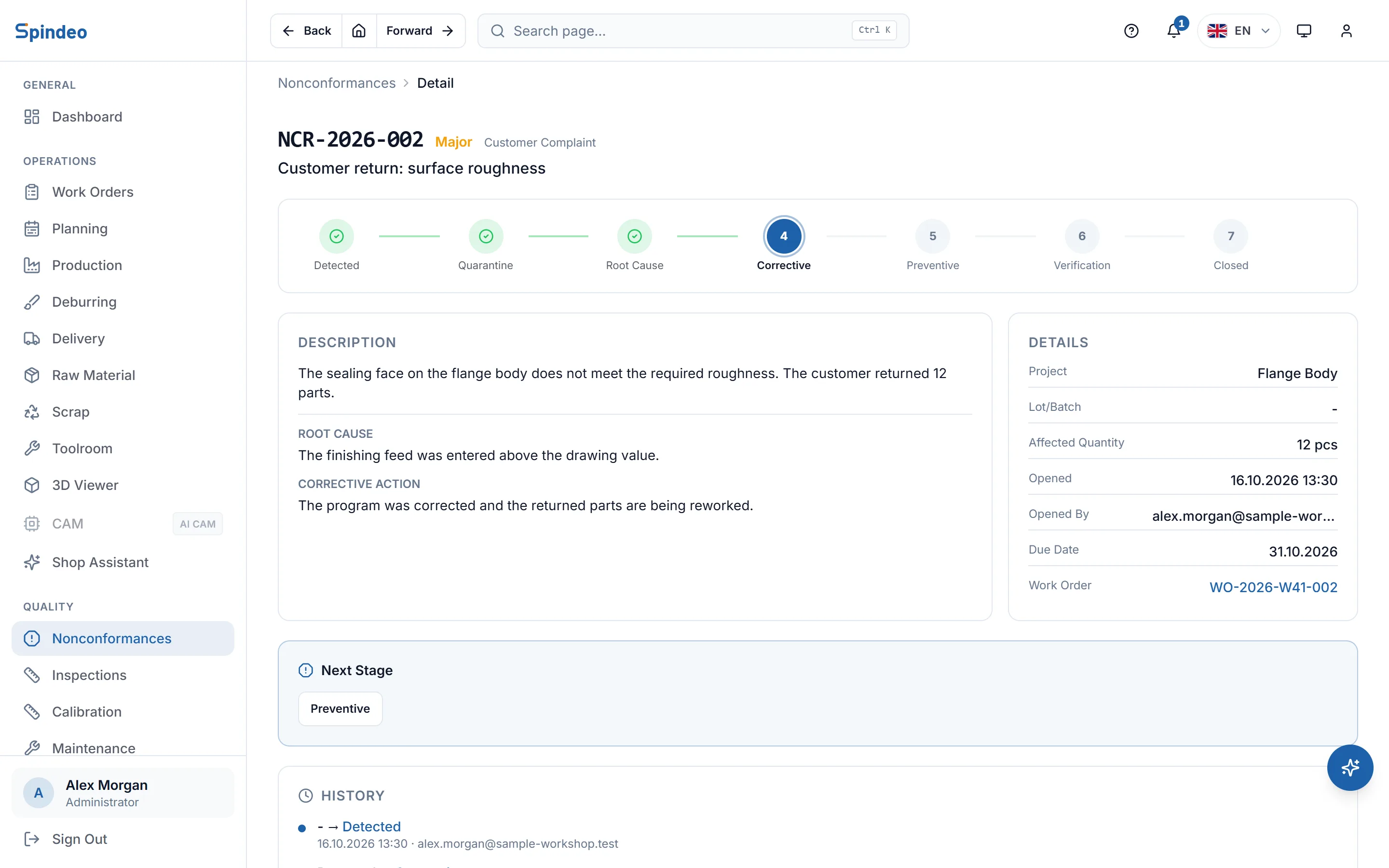
In Spindeo a nonconformance passes through seven stages: detected, quarantine, root cause, corrective, preventive, verification, closed. You cannot enter a stage until its root cause, corrective action, preventive action or verification evidence is written. Not every nonconformance needs preventive action; you decide that, with a reason, at the root cause stage. If verification fails, the record returns to the corrective stage.
The record opens from where the problem happened. Work orders, production entries and failed inspections have an Open NCR button, with the links filled in. You choose severity (minor, major, critical) and source (production, receiving, final inspection, customer complaint, supplier, internal audit). Corrective and preventive action need no separate record; they are stages of the same one.
If there is an open critical nonconformance or a record past its due date, a warning appears on the notification bell in the top bar. Nothing waits in someone's memory.
Calibration: track due dates in the system
An inspection done with an overdue caliper puts the inspection itself in doubt. Tracking calibration dates by hand slips easily.
In Spindeo you record each gauge once: name, code, type, serial number, location and calibration period. The next due date is calculated for you. A gauge 30 days from its due date turns yellow, an overdue one turns red, and both reach the notification bell. When a gauge comes back you enter the new date, the company that did the work and the certificate number, and the next due date is recalculated.
There are two limits here as well. The certificate file is not uploaded; its number and date are recorded. And an inspection record is not tied to a specific gauge; due dates are tracked from the gauge list.
Maintenance: a record tied to the machine
Maintenance records come up in audits, but their real use is day to day. How many times did a machine break down this year, which parts were replaced, what did it cost? Without those answers the maintenance budget is a guess.
In Spindeo, planned maintenance, breakdown repairs and periodic checks are kept as records tied to the machine: the work done, who did it or which outside service came, parts replaced, cost and next service date. A card on the home page shows upcoming maintenance and calibration together. How long a machine was down is a separate matter, entered in the downtime records on the production page.
Audit log: who changed what?
A quality record is only reliable if later changes are visible. The audit log in the Quality package keeps every create, change and delete in the app with the user and time, and shows field by field what changed. The log cannot be deleted from the screen.
To be clear: Spindeo does not promise a certificate or compliance with a standard. It keeps records in order and easy to find. Passing an audit depends on your own quality system and how you apply it.
What changes when a complaint arrives?
You learn what records are worth on a bad day. When a customer reports a dimension problem in a batch, the first questions are: which work order made it, what does the inspection report say, has this happened before? If the records are linked, you open the work order and see production entries and inspections in one place. You open a nonconformance with customer complaint as its source and link the project. You answer the customer from records, not from guesses.
Where should you start?
You do not have to set up all four records at once. We suggest this order:
- List all your gauges. It takes an afternoon and pays off at once.
- Start keeping inspection reports for new jobs linked to the work order.
- Open your first nonconformance on the next bad part and take it through to closing.
- Start recording machine maintenance.
Do not spend time moving old records. Past folders can stay in the archive; keeping things in order from today is worth more.
Frequently asked questions
What does the Quality package include?
Nonconformance, inspection, calibration, maintenance and the audit log. It opens on top of the free Production Tracking plan. The current price is on the pricing page.
Can I bring in a CMM report?
You upload it as a file: PDF, Word, Excel, text or image. Values in the report are not copied into dimension lines automatically; you enter lines by hand if needed.
Do I need a separate record for corrective action?
No. Corrective and preventive action are stages of the same nonconformance record. Root cause, corrective action, preventive action and verification evidence are written in order in one record.
Can I import old nonconformance records from Excel?
Not for now. Import covers work orders, companies, parts, projects and machines. Nonconformance records are opened in the app.
Spindeo's Quality package keeps inspection, nonconformance, calibration, maintenance and audit records tied to the work order and the machine.