Which job, on which machine, on which day
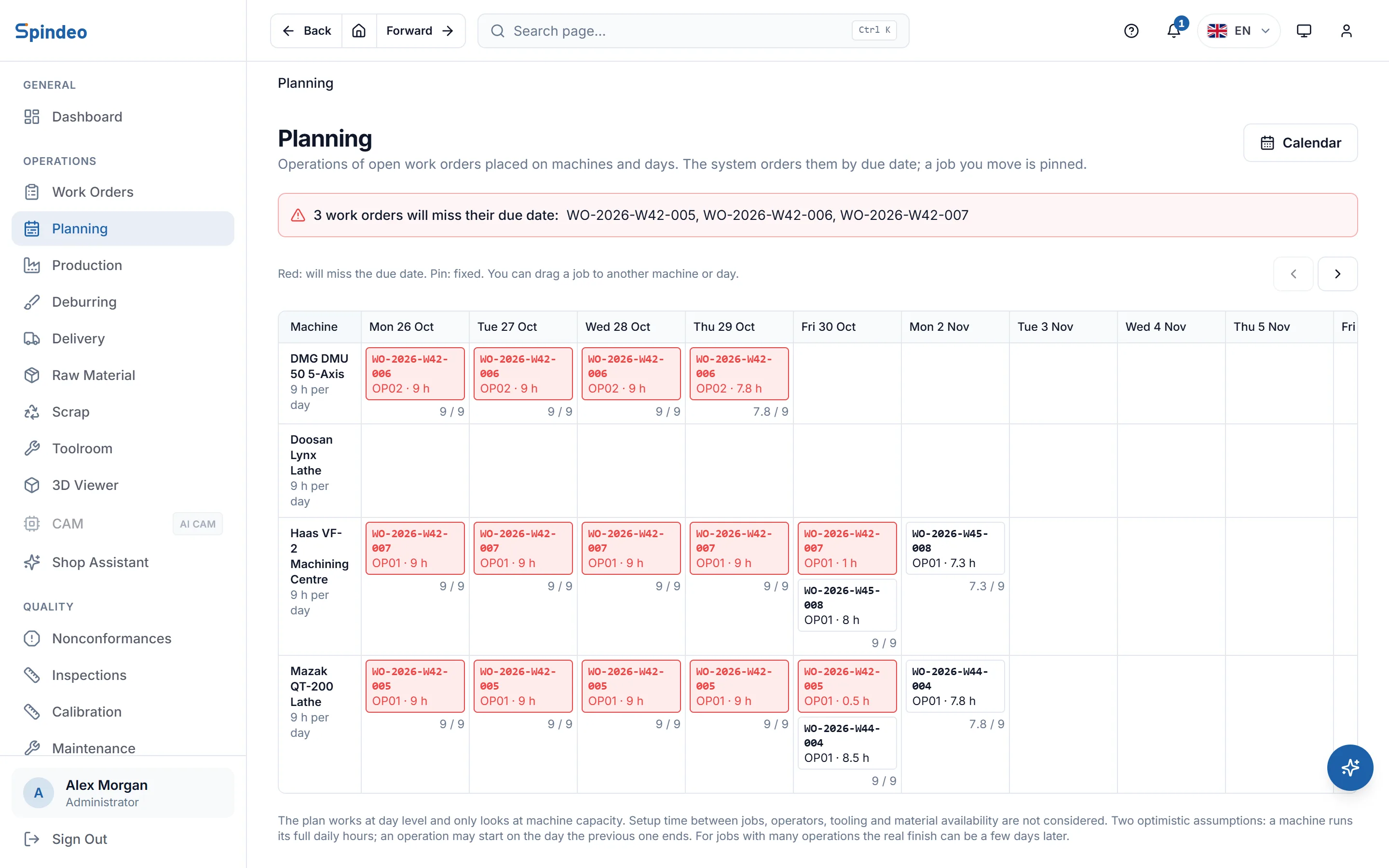
The planning screen places the operations of open work orders on machines and working days. The system orders them by due date, and you drag any job where you want it. A job that will miss its due date turns red before it has even started.
How it works
- 1
Enter each machine's daily hours
On each machine's card you enter how many hours a day it runs. An admin sets the working days and holidays in the working calendar.
- 2
Work orders join the plan on their own
The remaining quantity of each open work order is multiplied by the standard time in the process plan. Work orders are ordered by due date and each operation goes into the first free slot on its machine. If no machine is chosen, the one the operation was last produced on is suggested.
- 3
Move a job when you need to
When you drag a job to another machine or day, it is pinned there and the system will not move it. Remove the pin and the job goes back to the system.
- 4
Check the due date alert
Work orders that will miss their due date are listed at the top of the screen. The same alert shows on the dashboard and on the work order's own page, together with the estimated finish day.
What's included
Always up to date
The plan is not stored; it is recalculated every time it opens. As production is entered the remaining work shrinks and the plan shifts on its own, with nothing to update by hand.
Times based on real speed
If the machine has a realisation coefficient from its recorded run hours, times are corrected with it. If not, the standard time is used and the screen says it may be optimistic.
Pinned jobs stay put
The machine and start day of a job you moved are saved. If the day you chose is full or not a working day, the job moves to the first free day and tells you so.
Unplaced jobs in their own list
Operations with no machine, no standard time, or a machine without daily hours are listed separately with the reason. You pick a machine there and place them.
Working calendar
You enter once whether you work weekends and which days are holidays. The plan only puts work on working days and looks 180 days ahead.
Clear about its limits
The plan works at day level and only looks at machine capacity. Setup time between jobs, operators, tooling and material availability are not considered, and the screen says so.
Frequently asked questions
Try it in your own workshop
After you sign up you can open the sample workshop: browse the screens on this page in your own browser, then switch to your own data.