Reads the drawing, drafts the plan, answers from your data
The AI Assistant cuts down repetitive typing: it fills in part details from the drawing, drafts an operation plan and a cost estimate for a quote. The Shop Assistant answers your questions about production, downtime and scrap by looking at your recorded data. None of it saves anything on its own; the final call is yours.
How it works
- 1
Fill in the part from the drawing
On the part form you press Fill from drawing. Part number, name, revision, material, main dimensions, tolerances and surface treatment are read from the PDF drawing and written into the form. The part catalogue is in the Pro plan.
- 2
Get an operation draft
Ask for a draft on the process plan and, from the part details, your machine list and your past process plans, you get ordered operations with times, setup time and a suggested machine. The draft is added to the list as a suggestion; you correct and approve it.
- 3
A cost estimate for the quote
With the Sales plan, you choose an approved process plan and a quantity on the quote form. The AI only estimates the part's weight; machine coefficients, scrap rate and prices come from your own records. The figure is a cost, not a price; you add the margin.
- 4
Ask about your shop
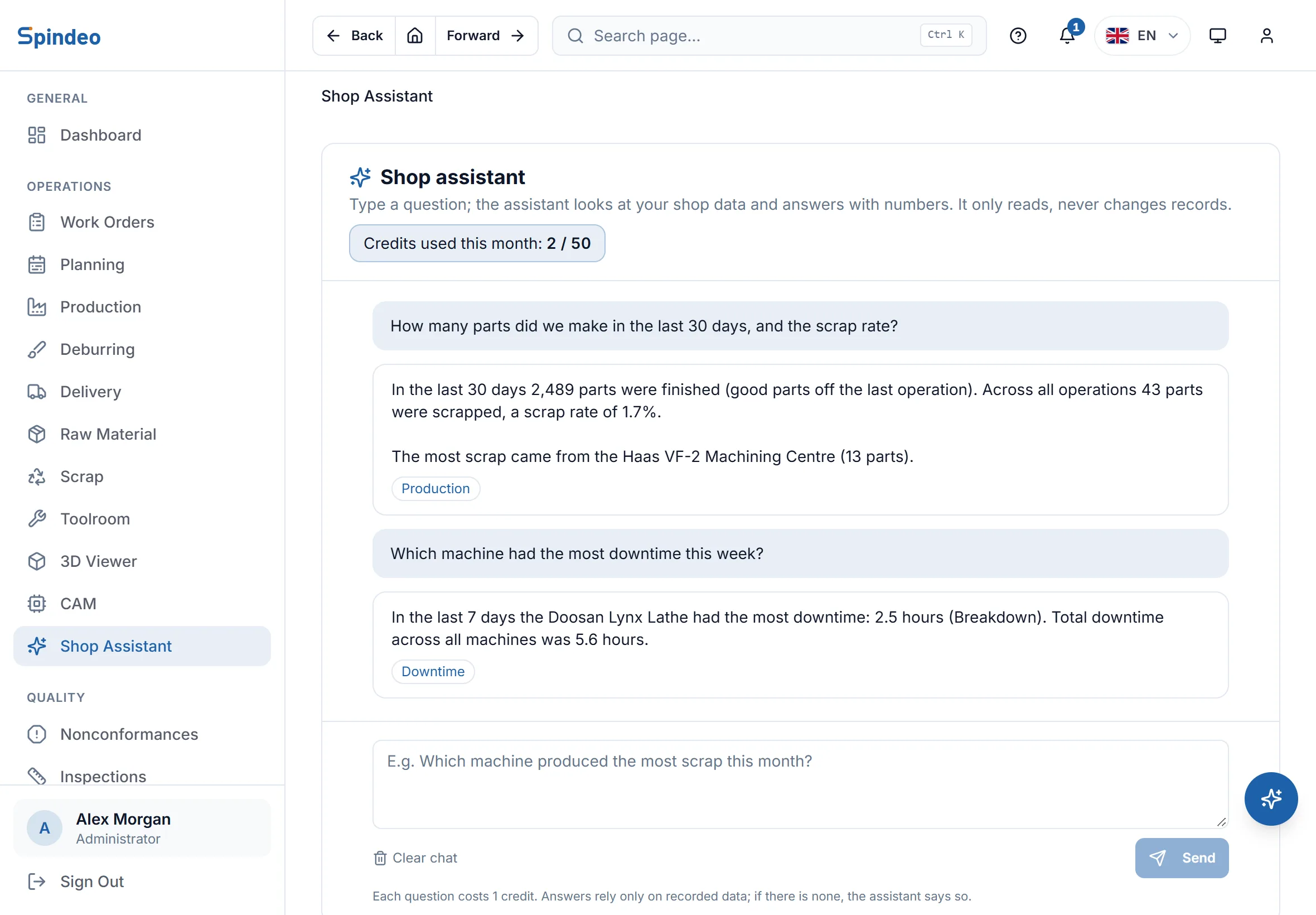
You type a question such as "Which machine had the most downtime this week?". The assistant looks at production, scrap, downtime, work order, machine and OEE records; if there are none, it says so.
What's included
Nothing saved without you
Drawing reading, drafts and estimates only fill in the form. You press save yourself, and you see the numbers before transferring them to a quote.
Based on your own data
The operation draft looks at your past plans and machines; the cost estimate looks at your machines' actual speed and your own prices. It does not pull figures from a generic table.
Missing items are not hidden
If an item in the estimate cannot be calculated it is left out of the total and the reason is shown. An estimate with missing items cannot be transferred to a quote, so your price does not end up too low.
The assistant only reads
The Shop Assistant never changes a record. It works with the user's permissions: a user who only sees their own machines gets answers about those machines only.
Open it from anywhere
The assistant opens on its own page in the menu or in the small panel at the bottom right of every screen, with the same chat. Answers link to the relevant page.
Runs on credits
The plan comes with credits every month. A question or a drawing read is 1 credit, a cost estimate is 2. If a request fails the credit is returned; your remaining credits are shown on screen.
Frequently asked questions
Try it in your own workshop
After you sign up you can open the sample workshop: browse the screens on this page in your own browser, then switch to your own data.