What is Spindeo? Production tracking for CNC machine shops
Spindeo keeps what a machine shop tracks, from work order to shipment, in one place. What the free plan includes, what each package does, what it won't do.
- Published:
- Author:
- Spindeo team
- 7 min read

Spindeo is production tracking software written for machine shops. How many parts came off which machine, how many were scrapped, why did the machine stop, when will the job finish: it takes those answers out of Excel files, paper forms and people's memory and puts them on one screen. It runs in the browser, needs no installation, and production tracking is free.
This article covers what Spindeo does, who it suits, how the packages are split and what it does not do today. We added that last part on purpose; knowing a product's gaps up front is cheaper than finding them later.
What problem does Spindeo solve?
Most shops have the information, but it is scattered. The work order sits in a folder, the quantity in a shift book, scrap in a spreadsheet, the quoted price in an email. When a customer calls to ask about their job, someone walks to the floor to look. At the end of the month, few people can say whether a job actually made money.
Spindeo connects these pieces into one chain: an accepted quote links to a project, the project to a work order, the work order to production records, and production to shipment and invoice. Open a record and you see the steps before and after it. Information is not typed twice; it flows from where it was entered to the other screens.
If you want to know the order in which to move off paper, we cover it in six steps from paper to digital.
How does a job move through Spindeo?
A typical job goes like this:
- A work order is opened. Part, quantity, due date and operation plan are set. The job sheet can be printed with a QR code.
- The operator starts the job. On the tablet at the machine they scan the QR code or pick the job from the list, enter their PIN and tap Start.
- Stops are recorded with a reason. When the machine stops, the operator picks a reason: breakdown, tool change, waiting for material or one you defined.
- Quantities are entered. When the job is done, good, scrap and rework quantities are entered. The production entry, downtime and the machine's running hours are created for you.
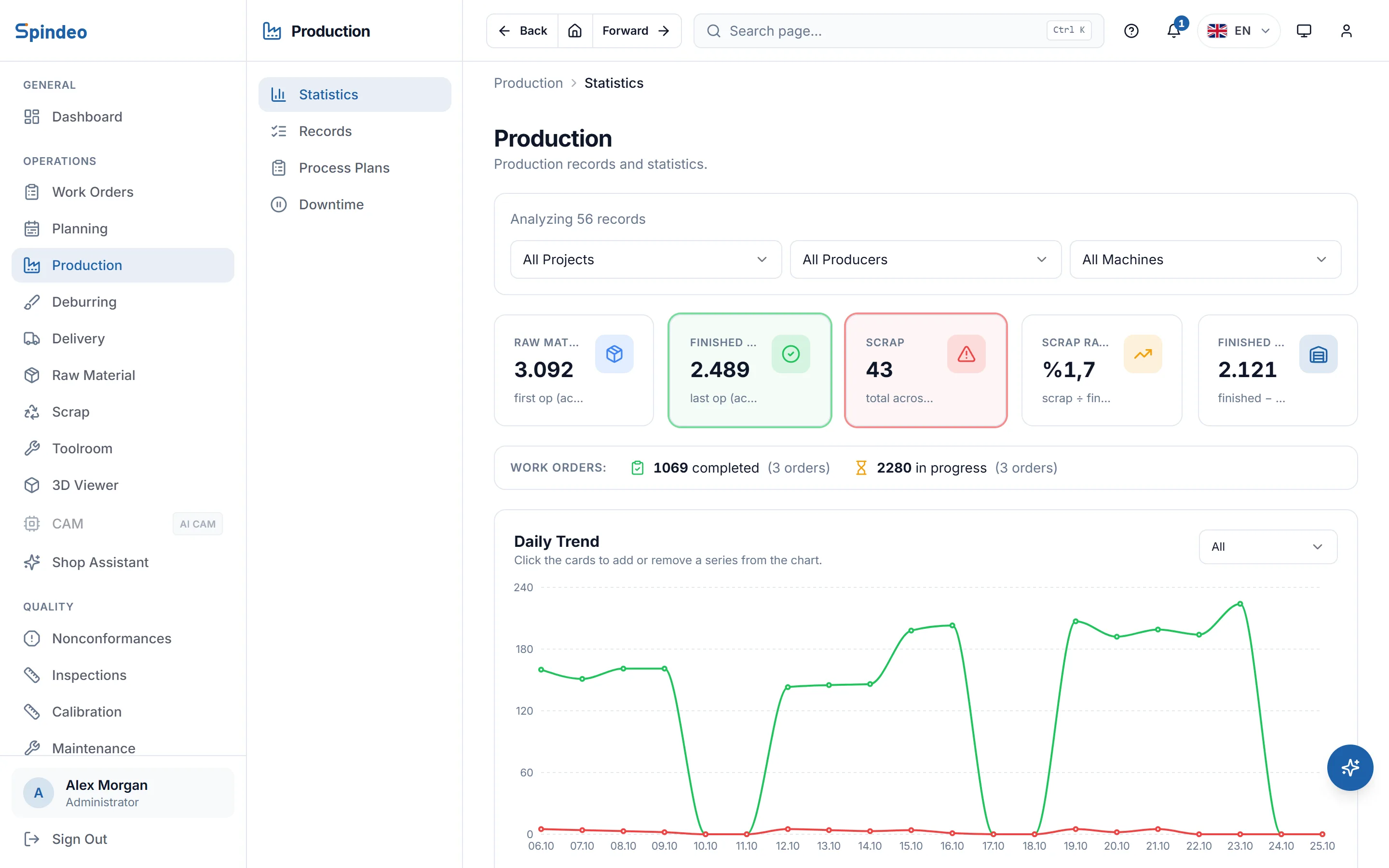
- The manager checks the summary. Which operation of which project has parts waiting and where scrap came from are visible without asking anyone.
A tablet is not required. Production can also be entered by hand on a computer, and the two methods can be used side by side.
What is in the free plan?
The Production Tracking plan is free, and it is not a trial. There is no time limit and no card is required. Work orders and production entries are unlimited; the plan includes 1 machine, 1 user and 500 MB of file storage.
It covers work orders, production records, operation plans, downtime records, machine tracking, projects and the operator terminal. Operators do not count towards user seats, so even a single-user free account can have several operators signing in on the tablet with a PIN.
When you need more machines or users you add them one at a time. That is why you can start on one machine and see the result with your own data instead of moving the whole shop at once.
How are the packages split?
We do not sell one big bundle. Production tracking is free; you open the other packages as you need them. They are billed monthly or yearly and can be closed at any time.
| Package | What it does | Includes |
|---|---|---|
| Production Tracking | Records daily production | Work orders, production, machines, operator terminal |
| Pro | Turns data into reports | OEE, profitability, scheduling, 3D viewer, part catalog |
| Quality | Ties quality to records | Nonconformance, inspection, calibration, maintenance, audit log |
| Traceability & Stock | Follows material to delivery | Raw material, chips, tool room, deburring, delivery |
| Sales | Follows money from quote to payment | Quotes, invoice records, accounts, contacts |
| AI Assistant | Cuts down typing | Drawing reading, operation drafts, cost estimates |
| AI CAM | Prepares programs from STEP | Plan, simulation, checks, G-code |
Current amounts are on the pricing page, along with the cost of adding machines and users. When you close a package your records are not deleted and stay readable.
Who is it for?
Spindeo was written with job shops in mind: many different parts, changing quantities, work done to order. It is not a general ERP meant to fit every industry. It follows how machining really works: operation sequence, setup, how many parts come from one bar, parts waiting for deburring, subcontracted production and selling chips.
The software will help if a few of these sound familiar:
- Work orders live in Excel and nobody knows who has the latest file.
- Scrap is noticed at month end, and nobody knows which machine it came from.
- Quotes are written without looking at how long the last job really took.
- A customer asks for a first article report and someone starts digging through folders.
- The answer to how much the machines run is "not bad".
It works for a one-machine shop and for a plant running several shifts. The price grows with machines, users and the packages you open; you do not pay for modules you do not use.
Why separate software if you have Excel?
Excel is a good tool and serves a small shop for a long time. The trouble starts when a file passes through several hands: two people cannot write at once, nobody notices a broken formula, and an operator cannot reach the file from the machine. Looking back at what happened with a part last time also gets lost between files. Moving to Spindeo does not mean leaving your data behind; you import your existing lists.
What does Spindeo not do?
We state clearly what it does not do today:
- It does not read data from machines automatically. Numbers come from records entered by operators and users, and OEE is only as accurate as those records.
- It does not work offline. Recording needs an internet connection. A tap made with no connection is not saved and must be entered later.
- It does not issue official e-invoices. You keep issuing those in your accounting software. Spindeo tracks the invoice record and the payment.
- It does not promise a certificate or compliance with a standard. It keeps quality records in order; passing an audit depends on your own quality system.
We suggest asking every product these questions. The full list is in 10 questions for choosing production tracking software.
How do you get started?
All you need is a free account. For the first day we suggest this order:
- Add a machine. A name and type are enough; the rest can come later.
- Write an operation plan for a part you make often.
- Open a real work order and run that job through Spindeo.
- After a few days of entries, look at the summary page.
If you already have lists, you can import companies, contacts, machines, parts, projects and work orders from Excel as tables. If your history is complicated, write to us and we will look at it together.
Frequently asked questions
Is Spindeo free?
The Production Tracking plan is free, with no time limit and no card required. It includes 1 machine, 1 user and 500 MB of file storage; work orders and production entries are unlimited. The quality, stock, sales, reporting and AI packages are paid monthly or yearly.
Do I need to install anything?
No. Spindeo runs in the browser on a computer, tablet or phone. The operator terminal needs no separate app either. An internet connection is required.
Where is my data kept?
Data is kept on Spindeo's own servers and backed up regularly. Each company's data is separate. Our security page has the details.
Are my records deleted if I close a package?
No. When you cancel, the module stays open until the end of the period you paid for and then closes. Your records are not deleted and stay readable.
The best way to understand Spindeo is with your own data: start on one machine with the free Production Tracking plan and record your first job.