Job costing and profitability in a CNC machine shop
A job's real cost is machine time, labour, material and other expenses. A worked example, common mistakes and how Spindeo's profitability report does it.
- Published:
- Author:
- Spindeo team
- 7 min read
The question shop owners ask most is simple: "Did this job make money?" The answer is often a guess. A time is estimated for the quote, the job finishes, the invoice goes out, and nobody puts the real hours next to the quoted price. The shop stays busy, yet the expected money never shows up in the bank.
This article covers what makes up a job's real cost, a worked example, the mistakes that distort the result and how Spindeo does the calculation. You can apply the method in Excel too; what matters is using the same rules on every job.
The four cost items
A job's cost fits into four items:
| Item | How it is calculated |
|---|---|
| Machine | Running hours x machine hourly cost |
| Labour | Running hours x operator hourly wage |
| Material | Parts machined x raw weight per part x price per kilogram |
| Other expenses | Outside processing, shipping, job-specific tooling |
In some shops labour is included in the machine hourly cost. That is a valid method as long as the same labour is not counted twice.
Revenue is the unit price from the accepted quote multiplied by the good quantity you can deliver. Scrap is not a separate cost item: the time and material of a scrapped part go into cost, but it brings no revenue. That is why scrap pulls profit down from two sides, and why reducing scrap rate is often the fastest way to raise it.
A worked example
Take a job of 100 parts. The figures are rounded examples, in Turkish lira (TRY).
Inputs:
- Quoted price: 450 TRY per part
- Parts machined: 100, good: 96, scrap: 4
- Measured running time: 18 hours
- Machine hourly cost: 1,200 TRY (labour included)
- Raw weight per part: 0.8 kg
- Material price: 120 TRY per kilogram
- Outside processing: 3,000 TRY
Cost:
- Machine: 18 x 1,200 = 21,600 TRY
- Material: 100 x 0.8 x 120 = 9,600 TRY
- Other: 3,000 TRY
- Total: 34,200 TRY
Revenue: 96 x 450 = 43,200 TRY
Profit: 43,200 - 34,200 = 9,000 TRY, about 20.8% of revenue.
Now suppose the job was quoted on the assumption of 15 hours. The extra 3 hours are 3,600 TRY, and the 4 scrapped parts are 1,800 TRY of lost revenue. Together those two items equal more than half of the remaining profit. The real value of the calculation is not one profit figure; it is seeing what has to change in the next quote.
Common mistakes that distort the result
Treating quoted time as real time. If cost uses the estimated time, every job looks as profitable as it was quoted. Without measuring real time, profitability is unknown.
Counting missing data as zero. Taking material as zero when no price was entered makes a job look better than it is. A missing item should stay missing.
Reading profit on a running job. While a job runs, cost is complete but revenue only comes from finished parts. The gap is not a loss. Talk about profit once the job closes.
Multiplying material by bar count. If 20 parts come from one bar, a calculation by bar count shows material 20 times too low. Use the number of parts and the raw weight per part.
Counting material at every operation. A part that passes through three operations does not use its material three times. Material counts only at the first operation.
Forgetting overheads. Rent and electricity are not job-specific, but they are real. If you leave them out of the machine hourly cost, true profit is lower than the calculation shows.
How do you set the machine hourly cost?
This is the most important number in the calculation, and it differs in every shop. A simple approach: add up the machine's yearly depreciation, maintenance, energy and share of rent, then divide by the hours it is really expected to run in a year. If you will not track labour separately, add the operator's cost too.
The common mistake is using the most hours the machine could run. If a machine could run 4,000 hours a year but really runs 2,500, the hourly cost should be based on 2,500. Knowing the real figure takes production and downtime records.
How do you use the result in quotes?
Knowing the real time changes how you quote. When the same part comes back, the measured time is on the table, not last time's estimate. A job that keeps running over needs a higher price or a better process. A job that looks profitable but holds a machine for a long time may be blocking better work if it earns little per hour. That is why it helps to compare jobs by earnings per machine hour as well as total profit.
How does Spindeo do this?
The profitability report on the Pro plan calculates the four items at work order level, adds them up by project and puts them next to the accepted quote. The project's Cost tab shows the items for each work order.
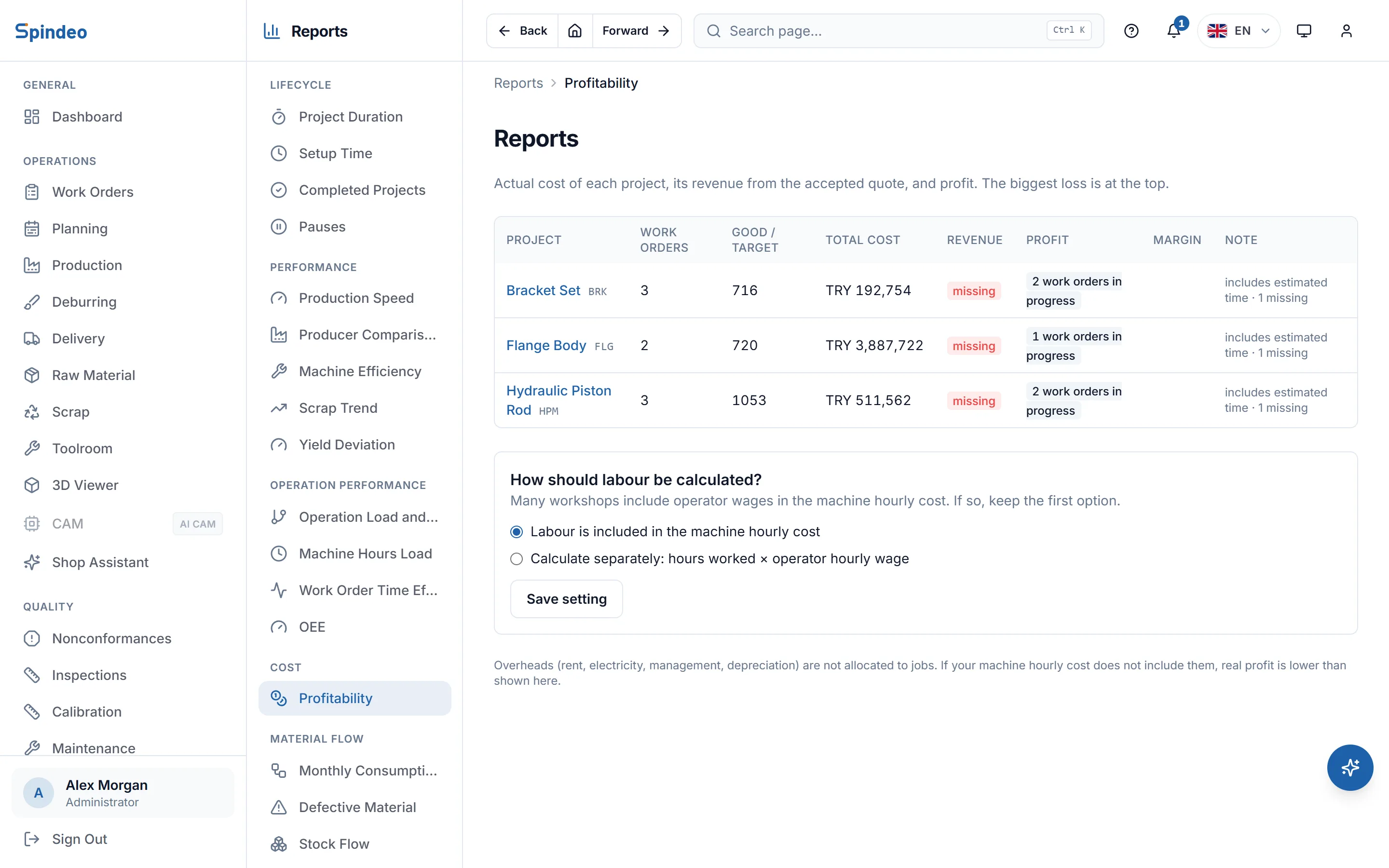
The report follows the rules in this article:
- Time: time from the operator terminal is measured, with stops taken out. For production entered by hand it uses quantity x standard time and marks the row as an estimate.
- Labour: a company setting includes it in the machine hourly cost or calculates it separately from the operator's wage.
- Missing data: never counted as zero. If the hourly cost, material price or accepted quote is missing, profit stays empty and the gaps are listed.
- Running jobs: no profit is shown; cost is what has been spent so far.
- Customer-supplied material: if the project is marked that way, material really is zero.
- Subcontracted production: not multiplied by your own machine rate; its price is entered as an expense row.
- Quotes in foreign currency: you enter the rate once on the project; cost is kept in lira.
Three things must be entered for the report to fill completely. Revenue comes from the accepted quote in the Sales package. Material prices are kept in the raw material records of the Traceability & Stock package. The machine hourly cost is written on the machine's card. Overheads are not spread across jobs; if you left them out of the hourly cost, the report reminds you on screen.
Where should you start?
Do not try to cost every job at once. Pick the three parts you repeat most and follow this order:
- Set your machines' hourly cost.
- Measure the real time on those three parts.
- Compare the result with the quoted price.
- If a job does not add up, look at time first, then scrap, then material.
Even three jobs often give a surprising result: a job that keeps everyone busy may be losing money, while a quiet repeat job carries the shop. The next quote is written with that knowledge.
Frequently asked questions
Why does profit show as not calculated?
Missing data is not counted as zero; if it were, the job would look more profitable than it is. If the hourly cost, material price or accepted quote is missing, profit stays empty and the gaps are listed. A running work order shows no profit until the job ends.
Are overheads such as rent and electricity included?
They are not spread across jobs. If you include them in the machine's hourly cost they count; if not, the real profit is lower than the report shows. The report reminds you of this on screen.
Can profitability be calculated without the operator terminal?
Yes. For production entered by hand, time is estimated from quantity x standard time and the row is marked as an estimate. Measuring time with the operator terminal makes the result more reliable.
Which package includes the profitability report?
The Pro package. Production records are in the free plan, so the data behind the report builds up from the start, and earlier records count once Pro is opened.
The reports in Spindeo's Pro package calculate job and project profitability from your production records, with no separate report to prepare.